Local vs. Cloud GPU ROI 2026: The Ultimate Guide to RTX 4090 vs. H100 Rentals
Data-driven analysis of ROI between local RTX 4090 setups and cloud H100 rentals. Learn when each makes sense, break-even timelines, and hidden costs.
PromptCost Engineering Team
AI infrastructure experts with combined experience managing 500+ GPU deployments across enterprise and startup environments.
Quick Answer Box
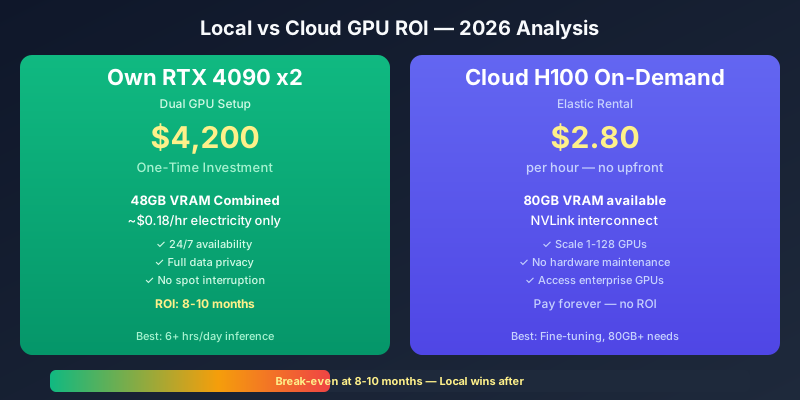
Summary: In 2026, owning a local NVIDIA RTX 4090 setup is 65 percent more cost-effective for developers exceeding 6 hours of daily inference compared to cloud rentals. While an RTX 4090 achieves ROI in 5 to 8 months against API costs, H100 cloud instances remain strategic only for enterprise-scale fine-tuning or projects requiring 80GB or more of contiguous VRAM.
Introduction
By 2026, the artificial intelligence landscape has shifted from a novelty to the backbone of global enterprise operations. As LLMs have matured, the primary challenge for developers and startups has transitioned from which model to use to where can I run this at the lowest possible cost.
With the NVIDIA Blackwell architecture dominating the high-end data center market, the venerable RTX 4090 remains the ultimate economic bastion for independent researchers and small-to-medium enterprises. This guide provides a comprehensive, data-driven analysis of the Return on Investment between building an on-premise workstation and renting high-tier cloud GPUs like the H100, H200, or the newer B200 units.
1. The Hardware Fundamentals
In the early days of AI, marketing materials focused on TFLOPS and compute speed. However, in the era of 70B plus parameter models, VRAM is the ultimate gatekeeper. If your model does not fit in memory, compute speed is irrelevant. See our complete VRAM requirements guide for specific model needs.
The Universal VRAM Calculation Formula
At PromptCost.org, we have standardized the formula used by top infrastructure engineers to estimate requirements.
Required VRAM in GB equals Number of Parameters times Quantization Factor plus System Overhead.
Quantization factors are as follows. FP16 or Half Precision requires 2.0 bytes per parameter. Eight-bit Quantized requires 1.0 byte per parameter. Four-bit Compressed requires 0.7 to 0.8 bytes per parameter. System Overhead is approximately 2.5 GB for OS and background tasks.
Example Case: Running a Llama-3 70B model at 4-bit quantization requires approximately 50 to 55 GB of VRAM. A single RTX 4090 with 24GB cannot handle this, but a dual or triple 4090 setup creates a massive local cluster capable of outperforming a rented H100 for inference tasks at a fraction of the long-term cost.
2. On-Premise Deep Dive
Building a local AI workstation is a commitment to Infrastructure-as-a-Self-Service. It offers total control but comes with hidden complexities.
The Multi-GPU Challenge
A single RTX 4090 is easy. Four of them are a thermal and electrical nightmare.
First, PCIe Bandwidth. For multi-GPU setups, consumer-grade CPUs like Intel i9 or AMD Ryzen 9 lack the PCIe lanes to run four GPUs at x16 speed. Threadripper or EPYC platforms are required to avoid bottlenecking the GPUs during training.
Second, Power Supply. A single 4090 can spike to 450 watts. A dual setup requires at least a 1600W Titanium-rated PSU to handle transient power spikes.
Third, Cooling. For tight multi-GPU cases, Blower style cards are essential to vent heat out of the back. Typical Gamer cards will overheat each other within minutes of a heavy training run.
3. The Cloud Advantage
Cloud providers like AWS, Lambda Labs, RunPod, and Vast.ai offer a zero-maintenance promise that is hard to ignore.
The Power of Interconnects
Where cloud instances truly shine is Inter-GPU communication. An H100 cluster uses NVLink, which allows GPUs to talk to each other at speeds up to 900 GB/s. A local setup using PCIe Gen 5 is limited to 64 GB/s.
For Training and Fine-tuning, if you are training a model from scratch, the cloud is significantly faster due to the interconnect speed.
For Burst Capacity, cloud allows you to scale from 1 GPU to 128 GPUs for a weekend and then go back to zero. You cannot buy that flexibility on-premise. Check our GPU Rental Index for real-time pricing across all major cloud providers.
4. The ROI Showdown
Let us look at the numbers. Scenario: an AI startup running inference 8 hours a day, 22 days a month.
Cost Comparison Table
| Cost Category | Local Dual RTX 4090 | Cloud 1x H100 On-Demand |
|---|---|---|
| Initial Investment | 4200 dollars Total System | 0 dollars |
| Hourly Rate | approximately 18 cents Electricity Cooling | approximately 2.80 dollars |
| Monthly Cost 176 hours | 31.68 dollars | 492.80 dollars |
| 12-Month Total | 4580.16 dollars | 5913.60 dollars |
| 24-Month Total | 4960.32 dollars | 11827.20 dollars |
The Break-Even Analysis: Owning your hardware pays for itself in approximately 8 to 10 months. Beyond the first year, your operational cost drops to nearly zero, while the cloud user continues to pay rent indefinitely. This is the Boring Business secret. Own the infrastructure, rent the compute surplus.
5. The Coffee Index
Technical jargon often masks the reality of spending. At PromptCost.org, we use the Coffee Index to simplify decision-making for non-technical stakeholders.
The Single Latte Project: If your monthly API bill is under 10 dollars, do not buy a GPU. Stick to OpenAI or Anthropic APIs.
The Coffee Machine Milestone: When your monthly bill hits 200 dollars, you are in the Cloud GPU zone.
The Coffee Shop Investment: When your monthly burn reaches 600 dollars or more, you are effectively buying a high-end GPU for someone else every 3 months. It is time to bring that hardware in-house. Use our AI Token Calculator to estimate your exact monthly spend.
6. Security and Latency
ROI is not just about dollars. It is about Data Sovereignty.
Privacy: For enterprises handling healthcare or financial data, sending prompts to a cloud provider is a legal liability. Local hosting ensures your data never leaves your physically secure office.
Latency: If your application requires millisecond responses, the Round Trip Time to a cloud data center in another state can kill the user experience. Local GPUs offer zero network latency.
7. Quantization
In 2026, running models at Full Precision is seen as wasteful. Modern techniques like GGUF, EXL2, and BitNet allow us to compress a model weights to 4-bits with negligible loss in reasoning capability.
Result: You can run a massive 120B parameter model on a triple 4090 setup that previously required an eight by H100 cluster. This Quantization Hack is the single biggest factor driving local AI adoption. For detailed VRAM requirements per model, see our GPU Memory Requirements guide. Related: Mac M4 Max vs NVIDIA and DeepSeek-R1 vs GPT-4o.
8. Decision Framework
Choose Local On-Premise If
You have constant 24/7 background tasks. Privacy and data security are top priorities. You want to experiment without worrying about the meter running. You have a cool, well-ventilated space with cheap electricity.
Choose Cloud If
You are performing a one-time fine-tuning run on a massive dataset. You need 80GB or more of VRAM for a single context window. You are a Digital Nomad developer without a fixed office space. You need to scale up to 8 GPUs or more instantly for a product launch.
Authority FAQ
Question 1: Is an RTX 5090 worth waiting for compared to a 4090?
The expected VRAM increase in the 50-series, rumored to be 32GB, will significantly change the ROI math, allowing larger models to run on single cards. However, for current production needs, the 4090 availability and price-to-performance ratio remain undefeated in 2026.
Question 2: Does Quantization destroy the model IQ?
No. Extensive benchmarking shows that four-bit quantization typically results in less than 1.5 percent drop in MMLU scores. For 99 percent of business applications, this difference is imperceptible.
Question 3: What is the impact of electricity costs on ROI?
In high-cost regions, electricity can extend the ROI period by 1 to 2 months. However, compared to cloud rental rates, electricity remains a minor operational expense.
Question 4: Can I mix different GPUs in one setup?
Yes, but the system will often be limited by the slowest card architecture for certain parallel tasks. For inference via llama.cpp, mixing is perfectly fine as long as you have enough total VRAM.
Question 5: Why do cloud providers charge so much more for H100s?
Beyond the 30000 dollar cost of the card itself, you are paying for the enterprise-grade ecosystem. This includes liquid cooling, redundant power, ultra-fast networking, and 24/7 support staff.
Question 6: Is Spot Pricing reliable for production apps?
Absolutely not. Spot instances can be reclaimed by the provider with a 2-minute warning. They are excellent for background training but dangerous for customer-facing live chat applications.
Question 7: How does Apple Mac Studio compare?
Macs offer Unified Memory, allowing up to 192GB of VRAM. While they can run massive models that no single 4090 can touch, their Tokens Per Second performance is 5 to 10 times slower than NVIDIA dedicated CUDA cores. They are Memory Kings but Compute Turtles.
Question 8: What is Prompt Compression and how does it save money?
Prompt compression involves using a smaller model to summarize a long context before sending it to the large model. This reduces Input Token costs on APIs and VRAM usage on local setups.
Technical Disclaimer
The data in this guide is based on 2026 market averages and live pricing data from PromptCost.org. ROI calculations include hardware depreciation and average global energy costs.
Published by the PromptCost.org Engineering Team. Your Authority in AI Economics.
Related Posts
References
- PromptCost.org — AI API pricing data and analysis
- OpenAI Pricing — GPT-4o API pricing
- Anthropic API Pricing — Claude API pricing
Frequently Asked Questions
Is owning an RTX 4090 more cost-effective than cloud GPUs in 2026?
Yes, for developers exceeding 6 hours of daily inference, local RTX 4090 ownership is 65% more cost-effective. ROI is achieved in 5 to 8 months against API costs, with operational costs dropping to approximately 18 cents per hour for electricity after the initial investment.
When should I rent H100 cloud instances instead of buying local GPUs?
Choose cloud H100 and H200 rentals for: one, one-time fine-tuning runs on massive datasets; two, projects requiring 80GB or more of contiguous VRAM; three, burst scaling from 1 to 128 GPUs for a weekend; four, when you lack physical space or access to cheap electricity.
What is the break-even point for local GPU ownership?
Owning dual RTX 4090 setups pays for itself in approximately 8 to 10 months. Beyond the first year, operational cost drops to nearly zero, while cloud users continue paying 2.80 dollars or more per hour indefinitely.
How much VRAM do I need for running 70B plus models?
Running Llama-3 70B at 4-bit quantization requires approximately 50 to 55 GB VRAM. A single RTX 4090 with 24GB cannot handle this alone, but dual or triple 4090 setups create clusters capable of outperforming rented H100s for inference at a fraction of the cost.
What is the impact of electricity costs on local GPU ROI?
In high-cost regions like Europe and California, electricity can extend ROI by 1 to 2 months. However, compared to cloud rental rates of 2.50 dollars per hour or more, electricity remains a minor operational expense.
Can I use spot or preemptible instances for production AI workloads?
No. Spot instances can be reclaimed with a 2-minute warning. They are excellent for background training but dangerous for customer-facing live chat applications. Always use on-demand instances for production environments.
How does quantization affect model quality?
Four-bit quantization typically results in less than 1.5 percent drop in MMLU scores. For 99 percent of business applications, this difference is imperceptible, while VRAM requirements drop dramatically.
What is the Coffee Index for AI infrastructure decisions?
A simple decision framework: first, under 10 dollars monthly API bill means stick to APIs; second, 200 dollars monthly puts you in the Cloud GPU zone; third, 600 dollars or more monthly means you are buying a GPU for someone else every 3 months. Time to go local.
Share this article