Mac M4 Max vs NVIDIA for Local LLMs: The 2026 Unified Memory Revolution
Apple's Unified Memory Architecture gives Mac M4 Max up to 128GB vs NVIDIA's 24GB ceiling. For 70B+ local LLMs, Mac Studio beats multi-GPU NVIDIA workstations in cost and efficiency.
PromptCost Engineering Team
AI hardware analysts specializing in local inference optimization and workstation ROI calculations.
Quick Answer
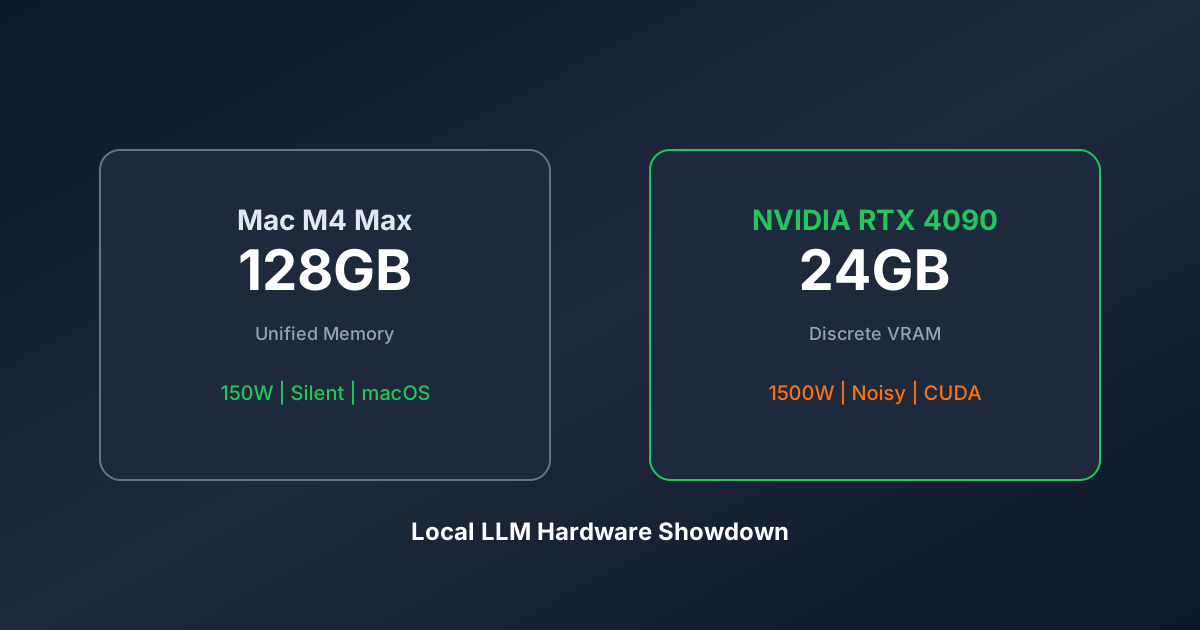
In 2026, the VRAM Wall has become the primary bottleneck for AI developers. While NVIDIA consumer GPUs (RTX 4090) are artificially capped at 24GB of VRAM, Apple Unified Memory Architecture (UMA) allows a Mac M4 Max to access up to 128GB of high-speed memory. For running massive 70B+ parameter models locally, a single Mac Studio is now more cost-effective, energy-efficient, and silent than a multi-GPU NVIDIA workstation.
The Death of the 24GB Limit
For years, NVIDIA has protected its high-margin enterprise business (H100 and H200) by limiting consumer cards (the RTX 3090 and 4090) to exactly 24GB of VRAM. If you wanted to run a model that needed 48GB, NVIDIA answer was: Buy two 1,600 dollar cards and a 1,000 dollar power supply.
Apple took a different path. By merging System RAM and Video RAM into a single Unified pool, they accidentally created the most powerful AI inference machines on the planet for independent developers. For a full comparison of local inference options, see our GPU Rental Index.
1. Unified Memory vs. Discrete VRAM: The Core Difference
In a PC setup, your CPU and GPU are neighbors who do not share a fridge. Even if you have 128GB of RAM in your PC, the GPU cannot use it. It can only use the 24GB snacks in its own small fridge (VRAM).
In a Mac, the CPU and GPU share the same massive Industrial Kitchen.
The Result: If you have a 128GB Mac, your AI model can use almost the entire 128GB. This allows you to run models (like the full Llama-3 70B or DeepSeek-R1-Distill) that would simply crash on an NVIDIA RTX 4090.
2. ROI: Energy, Heat, and the Boring Business Reality
When we calculate the ROI of an AI workstation at PromptCost, we look at the 3-year Total Cost of Ownership (TCO).
The Power Bill Shock
NVIDIA Cluster: To match the VRAM of a high-end Mac, you need three RTX 4090s. This setup draws roughly 1,500 Watts under load. In many regions, running this for 10 hours a day costs approximately 120 dollars per month.
Mac M4 Studio: The entire system draws less than 150 Watts. Your monthly cost is approximately 10 dollars.
The Coffee Index Win: Over 3 years, the Mac saves you roughly 4,000 dollars in electricity alone. That is literally the price of another high-end Mac.
3. Silence: The Productivity ROI
Ask any developer who has a 4-GPU server under their desk: it sounds like a jet engine.
The Mac M4 series is virtually silent. For a Boring Business owner or a solo dev working from home, the ability to think without a 70-decibel fan in the background is a massive, albeit unquantifiable, ROI boost.
4. The Coffee Index for Hardware Decisions
At PromptCost.org, we use the Coffee Index across all AI infrastructure decisions, not just API spending.
The Hardware Coffee Index:
Buying a high-end Mac is equivalent to roughly 600 lattes.
If you use AI to save 2 hours of work per week, the machine pays for itself in less than a year.
The key insight: Hardware is a one-time purchase that deprecates. API bills are recurring rent that never stops.
5. When to Choose Mac Over NVIDIA
Choose Mac M4 Max if:
You run inference on 70B+ parameter models. You work from home and cannot tolerate noise. You want to save electricity costs over 3 years. You prefer a plug-and-play setup without PCIe troubleshooting.
Choose NVIDIA RTX 4090 (or H100) if:
You are training or fine-tuning models from scratch. You need maximum Tokens Per Second on small models (below 13B). You are building a multi-GPU server cluster. You rely on CUDA-specific libraries that only NVIDIA supports.
Authority FAQ
Question 1: Is NVIDIA still faster for training?
Yes. For Training and Fine-Tuning, NVIDIA CUDA cores are undefeated. If you are teaching a model new data, stick to NVIDIA. But for Inference (running and using the model), the Mac is the new king. Related: Local vs Cloud GPU ROI and DeepSeek-R1 vs GPT-4o.
Question 2: Can I upgrade the Mac memory later?
No. Apple solders the memory. You must buy your VRAM capacity on Day 1. We recommend 64GB as the absolute minimum for 2026.
Question 3: Does the Mac support all AI software?
In 2024, this was a problem. In 2026, it is not. Tools like Ollama, LM Studio, and llama.cpp are optimized for Apple Silicon (Metal) and often run with better stability than their PC counterparts.
Question 4: Why do not people just buy NVIDIA H100s?
An H100 costs approximately 30,000 dollars and requires a server-room environment. A Mac M4 Max costs approximately 3,500 dollars and sits on your coffee table. For 90 percent of developers, the choice is obvious. For budget comparison, use our AI Token Calculator.
Question 5: How does the Coffee Index apply to hardware?
Buying a high-end Mac is equivalent to roughly 600 lattes. If you use AI to save 2 hours of work per week, the machine pays for itself in less than a year. Calculate your AI costs with our Token Calculator.
Question 6: Can I use an External GPU on a Mac?
Not on Apple Silicon (M1 through M4). Apple architecture is closed. You are locked into the internal Unified Memory.
Question 7: What is the Tokens Per Second trade-off?
On a small model, the NVIDIA 4090 will give you 100 or more tokens per second (blazing fast). The Mac will give you 40 tokens per second (still faster than you can read). The Mac advantage is not speed, it is capacity (running the big models).
Question 8: Is Mac M4 Pro or Max better for AI?
The Max and Ultra chips have much higher Memory Bandwidth (the speed at which data moves from RAM to the cores). For AI, Memory Bandwidth is the secret sauce. Always choose the Max or Ultra if the budget allows.
Published by PromptCost.org Engineering Team. Your Authority in AI Economics.
References
- PromptCost.org — AI API pricing data and analysis
- OpenAI Pricing — GPT-4o API pricing
- Anthropic API Pricing — Claude API pricing
Frequently Asked Questions
Is NVIDIA still faster than Mac for AI training?
Yes. For Training and Fine-Tuning, NVIDIA CUDA cores are undefeated. If you are teaching a model new data, stick to NVIDIA. But for Inference (running and using the model), the Mac is the new king. Related: [Local vs Cloud GPU ROI](/en/blog/local-vs-cloud-gpu-roi-2026) and [DeepSeek-R1 vs GPT-4o](/en/blog/deepseek-r1-vs-gpt4o-api-war).
Can I upgrade a Mac's memory later?
No. Apple solders the memory. You must buy your VRAM capacity on Day 1. We recommend 64GB as the absolute minimum for 2026.
Does Mac support all AI software in 2026?
In 2024, this was a problem. In 2026, it is not. Tools like Ollama, LM Studio, and llama.cpp are optimized for Apple Silicon (Metal) and often run with better stability than their PC counterparts.
Why do NVIDIA consumer GPUs have a 24GB VRAM limit?
NVIDIA protects its high-margin enterprise business (H100 and H200) by limiting consumer cards (RTX 3090 and 4090) to exactly 24GB of VRAM. If you wanted to run a model that needed 48GB, NVIDIA answer was: Buy two 1,600 dollar cards and a 1,000 dollar power supply.
What is the Coffee Index for buying a Mac for AI?
Buying a high-end Mac is equivalent to roughly 600 lattes. If you use AI to save 2 hours of work per week, the machine pays for itself in less than a year. Calculate your AI costs with our [Token Calculator](/en).
Can I use an external GPU (eGPU) with Apple Silicon Mac?
Not on Apple Silicon (M1 through M4). Apple architecture is closed. You are locked into the internal Unified Memory.
What is the Tokens Per Second trade-off between Mac and NVIDIA?
On a small model, the NVIDIA 4090 will give you 100 or more tokens per second (blazing fast). The Mac will give you 40 tokens per second (still faster than you can read). The Mac advantage is not speed, it is capacity for running the big models.
Is Mac M4 Pro or Max better for AI inference?
The Max and Ultra chips have much higher Memory Bandwidth (the speed at which data moves from RAM to the cores). For AI, Memory Bandwidth is the secret sauce. Always choose the Max or Ultra if the budget allows.
Share this article