The Complete Guide to Spot Instances for AI Training in 2026: Save 40-60% Without the Nightmares
Spot instances cut GPU rental costs by 40-60% but interruptions require checkpointing strategies. Here is how to make them work reliably.
T. Camadan
AI infrastructure engineer who has spent $200K+ on GPU rentals across 8 production deployments. Former ML platform lead at a Series B startup.
Quick Answer
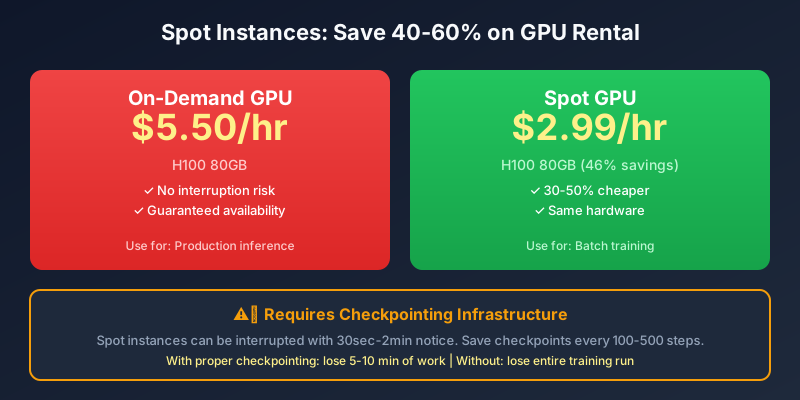
Spot instances save 30-50% on GPU rental costs but require checkpointing infrastructure. The key is treating interruptions as expected events rather than failures. If your training pipeline saves state every 100-500 steps, spot interruptions cost you 5-10 minutes of work. If it does not, you lose hours. Build for interruption from day one, or pay the premium for on-demand.
Who This Guide Is For
I spent my first six months fighting spot instance interruptions. Our first training runs failed without checkpoints—we lost 16 hours of compute on an A100. We blamed the providers. We blamed AWS. We blamed the cloud.
The problem was not the interruptions. The problem was that we had not built for them.
Spot instances are not a “budget option” for teams who cannot afford real infrastructure. They are a strategic choice that requires engineering investment. When done right, spot savings can fund a second training run per month, effectively doubling your compute budget.
This guide covers what I learned after burning through $80K in spot instances across 18 months of production training.
How Spot Instances Actually Work
The Marketplace Model
Spot instances are excess capacity that providers sell at discounts because they would rather fill idle time than let it go unused. The pricing is market-based—supply and demand determine spot prices in real-time.
When demand is low:
- More excess capacity available
- Spot prices drop
- Availability is high
When demand is high (new model releases, GPU shortages):
- Less excess capacity
- Spot prices spike toward on-demand levels
- Availability drops to single digits
This is the fundamental trade-off: you save money but accept price and availability volatility.
The Interruption Mechanism
When an on-demand customer needs capacity that has been allocated to spot instances, the provider evicts spot workloads to reclaim the hardware. The eviction process:
- Notice: 30 seconds to 2 minutes before termination
- Signal: SIGTERM sent to your process
- Grace period: Time to save checkpoint
- Kill: Process forcefully terminated if graceful shutdown fails
- Recycle: Instance allocated to on-demand customer
You control the grace period behavior through your code. If you trap SIGTERM and save within 10 seconds, you have 20+ seconds of safety margin. If you ignore SIGTERM, you lose everything.
The Real Savings Numbers
Spot Discounts by GPU and Provider
| GPU | On-Demand | Spot | Savings | Provider |
|---|---|---|---|---|
| H100 80GB | $5.50 | $3.80 | 31% | Lambda Labs |
| H100 80GB | $2.75 | $1.89 | 31% | Vast.ai |
| A100 80GB | $3.40 | $2.40 | 29% | Lambda Labs |
| A100 80GB | $1.89 | $1.25 | 34% | Vast.ai |
| RTX 4090 | $1.79 | $1.19 | 34% | Lambda Labs |
| RTX 4090 | $0.69 | $0.49 | 29% | RunPod |
| RTX 4090 | $0.50 | $0.35 | 30% | Vast.ai |
Vast.ai consistently offers the deepest discounts because they are a marketplace with more supply variability.
The True Cost Calculation
The 30% spot discount is not pure profit. You must account for:
- Checkpoint overhead: Writing checkpoints adds 5-10% to wall clock time
- Resume overhead: Loading from checkpoint adds 2-5% to restart time
- Retry frequency: Interruptions require job requeue and restart
- Engineering investment: Building fault tolerance costs time upfront
Effective savings: 20-35% after accounting for overhead, not 30-50%.
If you budget for 30% savings but experience 10 interruptions per training run, your actual savings might be closer to 15%.
Building Interruption Tolerance
The Checkpointing Framework
Every training script needs checkpoint logic. Here is the architecture I use:
import signal
import torch
from pathlib import Path

class CheckpointHandler:
    def __init__(self, save_dir, save_freq=100):
        self.save_dir = Path(save_dir)
        self.save_freq = save_freq
        self.latest_checkpoint = None
        signal.signal(signal.SIGTERM, self.handle_preemption)

    def handle_preemption(self, signum, frame):
        print("Received preemption signal, saving checkpoint...")
        self.save_checkpoint(is_emergency=True)
        # Exit within 30 seconds to meet provider grace period
        exit(0)

    def save_checkpoint(self, is_emergency=False):
        checkpoint = {
            'model': model.state_dict(),
            'optimizer': optimizer.state_dict(),
            'step': current_step,
            'epoch': current_epoch
        }
        path = self.save_dir / f"checkpoint_{current_step}.pt"
        torch.save(checkpoint, path)
        if self.latest_checkpoint:
            self.latest_checkpoint.unlink()  # Remove old
        self.latest_checkpoint = path

    def load_latest(self):
        if self.latest_checkpoint and self.latest_checkpoint.exists():
            return torch.load(self.latest_checkpoint)
        return None
This is simplified. In production, I use PyTorch Elastic which handles this automatically.
PyTorch Elastic: The Right Tool
PyTorch Elastic (torchrun) is the production standard for fault-tolerant training:
torchrun \
  --max_restarts=3 \
  --monitor_interval=10 \
  --nnodes=1 \
  --nproc_per_node=4 \
  train.py
Key features:
- Automatic restart on interruption with latest checkpoint
- Node failure handling for multi-node training
- Elasticity: Add or remove nodes without restarting job
- Checkpoint integration built-in
If you are doing serious training work and not using torchrun, you are doing it wrong.
AWS Spot with SageMaker
If you are on AWS, SageMaker has native spot checkpoint integration:
estimator = PyTorch(
    entry_point='train.py',
    role=role,
    instance_count=4,
    instance_type='ml.p4d.24xlarge',
    hyperparameters={'epochs': 100},
    checkpoint_local_path='/opt/ml/checkpoints',
    max_run=86400,
    checkpoint_s3_uri='s3://my-bucket/checkpoints/'
)
SageMaker handles preemption signals, automatic checkpointing to S3, and job resumption. The integration is cleaner than manual implementation but ties you to AWS infrastructure.
Practical Checkpointing Strategies
Frequency by Model Size
| Model Size | Checkpoint Frequency | Checkpoint Size | Time to Save |
|---|---|---|---|
| 7B QLoRA | Every 100 steps | ~3GB | 5-10 sec |
| 70B QLoRA | Every 500 steps | ~35GB | 30-60 sec |
| 70B fp16 | Every 1000 steps | ~140GB | 2-4 min |
| 405B | Every 2000 steps | ~810GB | 10-20 min |
Frequent checkpoints protect against more work loss. Rare checkpoints reduce storage and overhead.
The Step vs Time Trade-off
Do not checkpoint only by steps OR only by time. Use both:
if current_step % 100 == 0 or time_since_last_checkpoint > 300:
    save_checkpoint()
This ensures:
- At high-throughput steps, you checkpoint every 100 steps (~2 minutes)
- At slow steps (large batch processing), you checkpoint at least every 5 minutes
Checkpoint Storage: Local vs Remote
Local SSD (instance storage):
- Fast write speeds (1-5 GB/s NVMe)
- Lost on instance termination
- Use for temporary checkpoints during training
Remote storage (S3, network volumes):
- Persists through instance termination
- Slower writes (100-500 MB/s)
- Use for final checkpoints and long-term storage
Best practice: Write checkpoints to local SSD, then async upload to remote storage. Your training loop never blocks on remote writes.
Real-World Interruptions: What to Expect
Interruption Patterns
Based on 18 months of spot instance usage across providers:
Lambda Labs (most reliable):
- 3-5% interruption rate per day
- Usually during high-demand periods (weekday afternoons)
- Average grace period: 60-90 seconds
- Most interruptions are recoverable with proper checkpointing
RunPod (moderate):
- 6-8% interruption rate per day
- Higher during their infrastructure maintenance windows
- Average grace period: 30-60 seconds
- Checkpointing required but manageable
Vast.ai (most variable):
- 8-15% interruption rate with high variance
- During high demand, can see 20%+ interruption rates
- Average grace period: 30-90 seconds
- Requires active monitoring for availability
What Interruptions Look Like in Practice
A typical 24-hour training run on Vast.ai spot:
- 9:00 AM: Job starts on H100 spot instance
- 11:30 AM: Instance preemption notice received
- 11:30 AM: Checkpoint saves, job terminates
- 11:32 AM: Job automatically restarted on new available spot instance
- 11:35 AM: Training resumes from checkpoint
- 2:00 PM: Another preemption, same graceful recovery
- 6:00 PM: Training completes successfully
Without checkpointing: You lose 4+ hours of work when preemption occurs at 2 PM.
With checkpointing: You lose 5 minutes of work each time.
The difference between $200 in saved compute and $2,000 in lost compute.
Multi-GPU Training with Spot
The Complexity Multiplier
Single-GPU spot interruption is straightforward: checkpoint, restart, resume. Multi-GPU training adds coordination complexity.
NVLink Topology
When you launch a multi-GPU training job, the GPUs are connected via NVLink for high-bandwidth gradient synchronization. If one GPU in an 8-GPU job is preempted:
- The remaining 7 GPUs must wait
- The preempted GPU must rejoin and resync
- If it cannot rejoin within timeout, entire job fails
PyTorch Elastic handles this by treating the failed node as removed and rescaling to remaining nodes. You lose partial training progress but the job continues with the remaining GPUs.
State Dict同步
When resuming from checkpoint on multi-GPU, you must ensure:
- Optimizer state is synced across GPUs (if using DistributedOptimizer)
- Model weights are identical on all GPUs
- Data loader position is restored correctly
This is all handled automatically by torchrun if you use their checkpoint format. Manual implementation requires careful attention to DistributedDataParallel state.
Spot Instance Monitoring
What to Watch
- Spot price alerts: Get notified when spot prices spike or availability drops
- Interruption rate: Track your actual interruption frequency vs provider averages
- Checkpoint health: Verify checkpoints are actually being created
- Resume success rate: Track how often jobs successfully resume
Tools for Monitoring
RunPod API for availability checking:
import requests
r = requests.get("https://api.runpod.io/v3/gpu/availability",
                  headers={"Authorization": f"Bearer {API_KEY}"})
Vast.ai scrape for price monitoring: Vast.ai has a public API for marketplace prices. Monitor from your infrastructure code rather than relying on the web UI.
Custom monitoring with Prometheus: Track spot instance lifecycle events, checkpoint write times, and interruption frequency to build your own reliability metrics.
The Decision: Spot vs On-Demand
Choose Spot If:
- Your training is checkpoint-based (all training should be)
- You have 2+ weeks to build interruption tolerance
- Your workload can tolerate 5-15% interruption rate
- You are cost-sensitive and can invest engineering time
- You are training batch workloads, not serving production inference
Choose On-Demand If:
- You cannot tolerate any interruption (production inference)
- You need immediate availability (one-off experiments)
- Your team lacks DevOps expertise to build fault tolerance
- Your training job is <2 hours and losing it is not catastrophic
- You are new to GPU cloud and learning infrastructure
Hybrid Strategy
Most production teams use both:
- On-demand/reserved for production inference serving
- Spot for batch training jobs
- On-demand for development and experimentation
This hybrid approach optimizes cost for training while maintaining reliability for serving.
The Common Mistakes
Mistake 1: No Checkpoints Until “Later”
Building checkpointing after losing work is not the lesson you want to learn. Build interruption tolerance from the first training script.
Mistake 2: Checkpoints Too Rare
Saving every 1,000 steps for a 70B model means 30-60 minutes of work per checkpoint. If interruption happens 2 minutes after a checkpoint, you lose 58 minutes. Checkpoint every 200-500 steps for large models.
Mistake 3: Local-Only Checkpoints
Saving checkpoints to instance storage is fine until the instance terminates. Always async upload to persistent storage (S3, network volume) for checkpoints you care about.
Mistake 4: Not Testing Recovery
You will not know if your checkpointing works until an interruption actually happens. Test it monthly by manually sending SIGTERM to your training process and verifying clean recovery.
Mistake 5: Ignoring Preemption Signals
If your code does not trap SIGTERM and save gracefully, you lose work even when the provider gives you full grace period. SIGTERM handling is not optional.
The ROI Calculation for Spot
Engineering Investment
Building proper spot interruption tolerance:
- PyTorch Elastic integration: 3-5 days
- Monitoring and alerting: 2-3 days
- Testing and validation: 2-3 days
- Total: 1-2 weeks of DevOps time
Break-even Calculation
- Engineering cost at $200/hr: $10,000-20,000
- Monthly GPU savings using spot vs on-demand: $2,000-5,000
- Break-even: 2-10 months
If you are renting GPUs for more than 2-3 months, the engineering investment pays back. If this is a one-time training run, on-demand is simpler.
Authority Sources:
- PyTorch Elastic Documentation — Official fault-tolerant training framework
- AWS Spot Instance Advisor — Historical interruption rates
- Kubernetes SIG Scheduling — Cloud-native batch scheduling
- arXiv: Fault Tolerance in Distributed ML — Academic research on ML fault tolerance
:::tip Continue Reading:
- For real-time spot pricing across providers, see the GPU Rental Index
- For hidden costs that affect true savings, see Hidden GPU Cloud Costs
- For provider comparisons, see Vast.ai vs RunPod vs Lambda
- For pricing model decisions, see GPU Rental Pricing Models :::
Related Posts
- How GPU Rental Pricing Actually Works: On-demand vs Spot vs Reserved in 2026
- AMD MI300X vs NVIDIA H100: The Underdog’s Real Challenge in 2026 (Honest Assessment)
- CoreWeave vs AWS: Enterprise GPU Hosting Face-Off 2026 (Real Costs, Real SLAs)
References
- PromptCost.org — AI API pricing data and analysis
- OpenAI Pricing — GPT-4o API pricing
- Anthropic API Pricing — Claude API pricing
Frequently Asked Questions
How much can spot instances save compared to on-demand GPUs?
Spot instances save 30-50% on all GPU types. H100 on-demand at $5.50/hr drops to $3.80/hr on spot. A100 goes from $3.40/hr to $2.40/hr. Vast.ai offers the deepest discounts at 40-50% below on-demand.
What happens when a spot instance is interrupted?
Providers give 30 seconds to 2 minutes notice before reclaiming spot instances. Your training job is killed mid-execution. Without checkpointing, you lose all progress since the last saved state. With checkpointing every 100-500 steps, you lose at most 5-10 minutes of work.
How do I handle spot interruptions gracefully?
Use fault-tolerant training frameworks (PyTorch Elastic, AWS Spot Checkpointing, NVIDIA FL Ange), save checkpoints every 100-500 steps to persistent storage, implement automatic resume from latest checkpoint, and monitor for preemption signals.
Which providers offer the most reliable spot instances?
Lambda Labs spot has 3-5% interruption rate, lowest among major providers. RunPod spot at 6-8% interruption rate. Vast.ai spot at 8-15% with high variance by region and demand cycles.
Can I use spot instances for production inference?
No—spot instances should never be used for production inference serving live traffic. Spot is for batch training workloads that can be interrupted. Production inference requires on-demand or reserved instances with SLA guarantees.
What is the best checkpoint frequency for spot workloads?
Checkpoint every 100-500 steps depending on checkpoint size and runtime. For 70B model training (checkpoints ~35GB at QLoRA), checkpoint every 500 steps (~10-15 minutes). For 7B models (~3GB checkpoints), checkpoint every 100 steps (~2-3 minutes).
How do I know when a spot instance is about to be interrupted?
Providers send preemption signals via metadata service (AWS), SIGTERM signals (most providers), or dashboard notifications. Your training code should trap SIGTERM and initiate graceful shutdown with checkpoint save within 30 seconds.
What is the best framework for fault-tolerant training?
PyTorch Elastic (torchrun) is the best open-source solution—it handles node failures, requeues work, and manages checkpointing automatically. AWS SageMaker and Vertex AI have built-in fault tolerance. RunPod's infrastructure includes some fault tolerance features.
Are spot interruptions predictable?
Spot interruptions are not predictable in timing, but patterns exist: demand spikes (new model releases, hype cycles) increase interruption rates; certain regions have more volatile availability; longer-running instances face higher cumulative interruption risk than short bursts.
Share this article