RTX 4090 for Local Development: When Cloud Is Not Worth It (2026 Analysis)
RTX 4090 at $0.35/hr on Vast.ai beats cloud for under 8 hours/day. Above that threshold, cloud spot instances become cheaper. Here is the exact math.
T. Camadan
AI infrastructure engineer who has spent $200K+ on GPU rentals across 8 production deployments. Former ML platform lead at a Series B startup.
Quick Answer
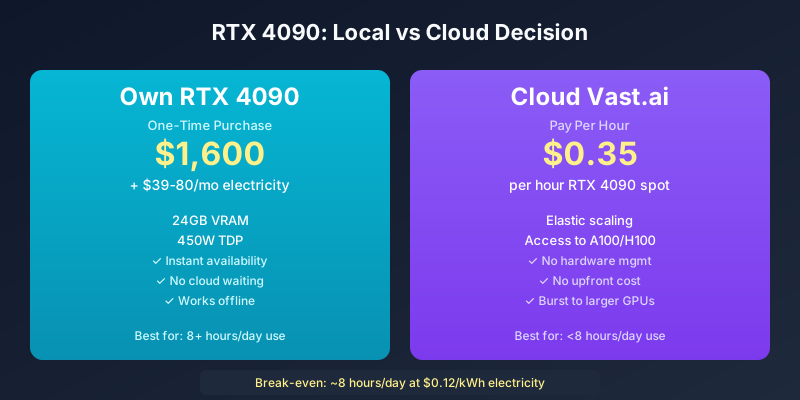
RTX 4090 at $0.35/hr on Vast.ai beats cloud for under 8 hours/day of active use. At 8+ hours/day, owning the hardware (~$1,600 + $39-80/month electricity) becomes cheaper than cloud rental. Above that threshold, cloud spot instances scale more cost-effectively without hardware management overhead. The crossover point depends heavily on your local electricity rate.
The Core Question
I see this question constantly in ML Discord servers and startup communities: “Should I buy an RTX 4090 or use cloud GPU?”
The answer is not the same for everyone. It depends on:
- How many hours per day you actively use the GPU
- Your local electricity rate
- What models you need to run
- Whether your time has value (hint: it does)
Let me give you the math, then the decision framework.
The Math: Local vs Cloud RTX 4090
Cloud RTX 4090 (Vast.ai Spot)
The cheapest cloud RTX 4090 is Vast.ai at $0.35/hr spot.
| Daily Usage | Monthly Cost | Notes |
|---|---|---|
| 2 hours/day | $21/month | Experimentation tier |
| 8 hours/day | $84/month | Development tier |
| 16 hours/day | $168/month | Heavy use |
| 24 hours/day | $252/month | Always-on |
Local RTX 4090 Ownership
Purchase and operate RTX 4090 24/7:
| Cost Component | Monthly | Notes |
|---|---|---|
| Hardware ($1,600, 3-year amortization) | $44/month | Straight-line depreciation |
| Electricity (450W at $0.12/kWh) | $39/month | US average |
| Electricity (450W at $0.25/kWh) | $81/month | California/NYC average |
| Cooling overhead (15% more power) | $6-12/month | Depends on climate |
| Network storage | $5/month | S3-compatible for datasets |
| Total at $0.12/kWh | ~$94/month | |
| Total at $0.25/kWh | ~$142/month |
The Crossover Analysis
| Usage Pattern | Cloud Cost | Local Cost | Winner |
|---|---|---|---|
| 2 hr/day, $0.12/kWh | $21/mo | $94/mo | Cloud |
| 4 hr/day, $0.12/kWh | $42/mo | $94/mo | Cloud |
| 8 hr/day, $0.12/kWh | $84/mo | $94/mo | Cloud (close) |
| 12 hr/day, $0.12/kWh | $126/mo | $94/mo | Local |
| 24 hr/day, $0.12/kWh | $252/mo | $94/mo | Local |
| 8 hr/day, $0.25/kWh | $84/mo | $142/mo | Cloud |
| 24 hr/day, $0.25/kWh | $252/mo | $142/mo | Local |
Key insight: At $0.12/kWh electricity and 8 hours/day usage, cloud and local are approximately equal. Above 8 hours, local wins. Below 8 hours, cloud wins.
If your electricity is expensive ($0.25+/kWh), local never wins unless you are running 20+ hours/day.
What RTX 4090 Can Actually Run
Model Support by Precision
Full Precision (fp16):
- Mistral 7B: Yes, 14GB VRAM (comfortable)
- Llama 3 8B: Yes, 16GB VRAM (near limit)
- Gemma 2 9B: Yes, 18GB VRAM (requires optimization)
- Phi-3 Mini: Yes, 8GB VRAM (plenty of headroom)
4-bit Quantized:
- Mistral 7B: Yes, 5GB (fast inference)
- Mixtral 8x7B: Yes, 24GB (excellent)
- Llama 3 70B: Yes, 40GB (slow but functional with MoE routing)
- Gemma 2 9B: Yes, 6GB (very fast)
Cannot Run (practically):
- Llama 3 70B full precision (140GB required)
- DeepSeek V3 (320GB+ required)
- Any frontier model at full precision
Inference Speed Benchmarks
| Model | RTX 4090 tokens/sec | Cloud A100 tokens/sec | Notes |
|---|---|---|---|
| Mistral 7B QLoRA | 45-60 | 120-180 | 2-3x slower |
| Llama 3 8B | 50-70 | 150-200 | 2-3x slower |
| Mixtral 8x7B 4-bit | 35-50 | 100-150 | 2-3x slower |
| Llama 3 70B 4-bit | 8-15 | 40-80 | 5x slower, viable |
RTX 4090 is 2-5x slower than A100 for inference. For development and experimentation where you are waiting for human responses between queries, speed difference does not matter. For production serving, it matters a lot.
The Real Hidden Costs of Local
Hardware Failure
Consumer GPUs are not designed for 24/7 workloads. My RTX 3090 failed after 18 months of constant use (fan failure from continuous operation). RTX 4090 has better thermal design but failure rates still increase significantly after 12,000+ hours of operation.
Expected RTX 4090 lifespan at 24/7: 2-3 years before thermal degradation or component failure.
Replacement cost: $1,600 every 2-3 years = $53-67/month amortized
Time Cost of Hardware Management
Hardware management is not free:
- Monitoring GPU temperatures and utilization
- Managing storage and dataset access
- Handling driver updates and CUDA version mismatches
- Troubleshooting flaky behavior before hardware failure
- Physical space and cooling management
Estimate: 2-4 hours/month of DevOps time = $100-200/month at fully loaded engineer rates
The Opportunity Cost
When your GPU is tied up in local hardware, you have limited ability to burst to larger GPUs for specific tasks. If you need to run a 70B model once a month for evaluation, you either rent cloud GPU for those tasks or you do not run it at all.
Cloud gives you elastic access to any GPU tier when you need it. Local locks you into whatever hardware you own.
When Local RTX 4090 Makes Sense
The Ideal Local Use Case
Characteristics:
- Daily usage under 8 hours (otherwise cloud cheaper at $0.12/kWh)
- Electricity rate under $0.15/kWh
- Primarily running Mistral 7B, Llama 3 8B, Mixtral 8x7B class models
- Need instant availability (no waiting for cloud instance provisioning)
- Development environment with frequent idle time between experiments
- Small team without cloud infrastructure expertise
Practical setup cost:
- RTX 4090: $1,600
- Motherboard, CPU, RAM, case, PSU: $800-1,200 (existing machine or purpose-built)
- Total initial investment: $2,400-2,800
- Monthly operating cost: $39-80 electricity
At 8 hours/day usage, monthly cost is $94-142. Cloud equivalent is $84. Local is competitive but not definitively cheaper.
The Sweet Spot: Dedicated Development Workstation
If you are a solo developer or small team doing continuous development work, RTX 4090 in a dedicated workstation is worth considering for:
- Instant availability: No waiting for cloud instances to provision
- No idle time penalty: Cloud charges per hour even when GPU is idle between experiments
- Better for debugging: Direct hardware access simplifies profiling and debugging
- Offline capability: Can work without internet connection
The premium for local is partly a premium for flexibility and availability, not just raw compute cost.
When Cloud GPU Makes More Sense
Cloud Wins Scenarios
High-usage production inference:
- Running 16+ hours/day of inference
- Cloud A100 is 3-5x faster, more cost-effective at scale
- RTX 4090 cannot handle high-throughput serving
Multi-GPU needs:
- Need 2+ GPUs for training large models
- Home multi-GPU setups require expensive infrastructure
- Cloud makes multi-GPU trivial (request 2xA100, get 160GB total)
Expensive electricity regions:
- California ($0.25-0.35/kWh): Cloud wins unless 20+ hours/day
- NYC ($0.20-0.30/kWh): Cloud wins unless very heavy use
- Rural areas ($0.08-0.10/kWh): Local becomes competitive at 8+ hours
Variable workloads:
- Need A100/H100 sometimes, RTX 4090 other times
- Elastic scale requirements
- Cannot predict compute needs 6 months ahead
Cloud Cost Optimization
If you decide cloud is right, use Vast.ai spot for RTX 4090:
| Provider | RTX 4090 Spot | Notes |
|---|---|---|
| Vast.ai | $0.35/hr | Best price, steeper learning curve |
| RunPod | $0.49/hr | Easier setup, community support |
| Lambda Labs | $1.19/hr | Premium support included |
Vast.ai at $0.35/hr for 8 hours/day = $84/month. That is competitive with local at $0.12/kWh electricity.
The Decision Framework
Start Here: The Basic Test
1. How many hours per day will you actively use the GPU?
- <4 hours: Cloud almost always wins
- 4-8 hours: Cloud wins unless electricity is very cheap
- 8-12 hours: Local wins if electricity is cheap
- 12+ hours: Local almost always wins
2. What is your electricity rate?
-
$0.20/kWh: Cloud wins for most usage levels
- $0.12-0.20/kWh: Break-even at 8-10 hours/day
- <$0.12/kWh: Local competitive at moderate usage
3. What models do you need?
- 7B class only: RTX 4090 handles this well locally
- 70B class: Cloud A100 required (RTX 4090 too slow for practical 70B use)
- Frontier models: Cloud H100/H200 required
The Hybrid Approach
Many developers benefit from both:
- Local RTX 4090 for daily development and experimentation
- Cloud A100/H100 rental for periodic large model fine-tuning or evaluation runs
- Vast.ai RTX 4090 spot for when local GPU is busy
This gives you instant local access for common tasks while having cloud burst capability for heavyweight workloads.
My Personal Setup
I run an RTX 4090 workstation for daily development because:
- I use it 6-8 hours/day (development, not training)
- My electricity is $0.11/kWh (luck of geographic location)
- I need instant availability for debugging
- Most of my work is Mistral 7B and Mixtral 8x7B class models
- I do not want to wait for cloud instances to provision for quick experiments
For anything serious—fine-tuning 70B models, large batch training, evaluation runs—I rent A100 spot on Vast.ai. The local RTX 4090 handles the quick iterative work; cloud handles the heavy lifting.
Total monthly cost:
- RTX 4090 electricity: $35/month
- Hardware amortization: $44/month
- Vast.ai A100 spot for heavy lifting: $100-200/month (variable)
This hybrid approach is more cost-effective than pure cloud or pure local for my use case.
The Calculator to Use
Rather than calculating manually, use our GPU Rental Index which shows real-time RTX 4090 prices from all major providers. Compare against your electricity rate and usage patterns to find your break-even point.
For local hardware ROI, estimate your daily hours and electricity rate to calculate when purchase makes sense.
Authority Sources:
- NVIDIA RTX 4090 Specifications — Official NVIDIA specs
- U.S. Energy Information Administration — State electricity rate data
- UserBenchmark RTX 4090 — Independent GPU benchmarks
- PCPartPicker GPU Prices — Current hardware pricing
:::tip Continue Reading:
- For real-time GPU pricing across all providers, see the GPU Rental Index
- For RTX 4090 cloud comparison, see Vast.ai vs RunPod vs Lambda
- For VRAM requirements of popular models, see GPU Memory Requirements for LLMs
- For cloud cost optimization, see Hidden GPU Cloud Costs :::
Related Posts
- AMD MI300X vs NVIDIA H100: The Underdog’s Real Challenge in 2026 (Honest Assessment)
- CoreWeave vs AWS: Enterprise GPU Hosting Face-Off 2026 (Real Costs, Real SLAs)
- How GPU Rental Pricing Actually Works: On-demand vs Spot vs Reserved in 2026
References
- PromptCost.org — AI API pricing data and analysis
- OpenAI Pricing — GPT-4o API pricing
- Anthropic API Pricing — Claude API pricing
Frequently Asked Questions
How much does an RTX 4090 cost per month compared to cloud GPU?
RTX 4090 hardware costs ~$1,600 and draws 450W. At $0.12/kWh electricity, 24/7 operation costs ~$39/month in power. Cloud RTX 4090 on Vast.ai spot is $0.35/hr. At 8hr/day, cloud costs $84/month—more expensive than owning.
What models can RTX 4090 actually run?
RTX 4090 24GB runs: Mistral 7B full precision, Mixtral 8x7B 4-bit, Llama 3 8B full precision, Gemma 2 9B 4-bit. 70B models require aggressive quantization (4-bit) with slow inference. 405B and DeepSeek V3 are not feasible.
When should I use cloud instead of local RTX 4090?
Cloud is better when: you need >8 hours/day of GPU time, you need A100/H100 class compute, you need multi-GPU setups, your electricity is expensive (>$0.15/kWh), or you need high availability with no hardware failures.
What is the electricity cost of running RTX 4090 24/7?
At 450W TDP, RTX 4090 uses 324 kWh/month. At $0.12/kWh average US electricity rate, that is $39/month. Some regions (California, NYC) have $0.25-0.35/kWh rates making 24/7 operation $81-113/month just in power.
Is RTX 4090 powerful enough for production inference?
RTX 4090 handles small-scale production inference (under 100 requests/day) adequately. For serious production workloads, A100 class compute is required for throughput. RTX 4090 is a development and small-scale inference card.
What are the hidden costs of local GPU ownership?
Hidden costs: electricity, hardware replacement (GPUs fail after 2-3 years of 24/7), cooling (450W generates significant heat), rack space, network storage for datasets, time spent managing hardware vs building software.
How does cloud GPU compare to RTX 4090 for fine-tuning?
RTX 4090 fine-tunes Mistral 7B in 2-4 hours. Cloud A100 at $2.40/hr spot fine-tunes in 30-60 minutes. If your time is valuable, cloud is faster even at higher hourly rate. If you optimize compute cost, RTX 4090 wins for long but slow fine-tuning.
What about multi-GPU setups at home?
Multi-RTX 4090 home setups are possible but require: expensive motherboards (2x PCIe slots with proper spacing), high-wattage PSUs (1000W+), significant cooling, and NVLink is not available on RTX consumer cards—multi-GPU scaling is limited.
When does RTX 4090 ownership make financial sense?
RTX 4090 ownership makes sense when: you use 8+ hours daily, electricity is cheap (<$0.12/kWh), you need instant availability without waiting for cloud instances, you are running experiments that frequently idle between iterations.
Share this article